Docker Compose and persistent agents
Station can run inside a container and manage separate sandbox containers through an operator-owned Docker engine. Compose starts the controller and dashboard; Station creates and supervises the workloads. A persistent agent such as Hermes runs inside its own sandbox with Bash, Git, Node, Python and a writable home volume.
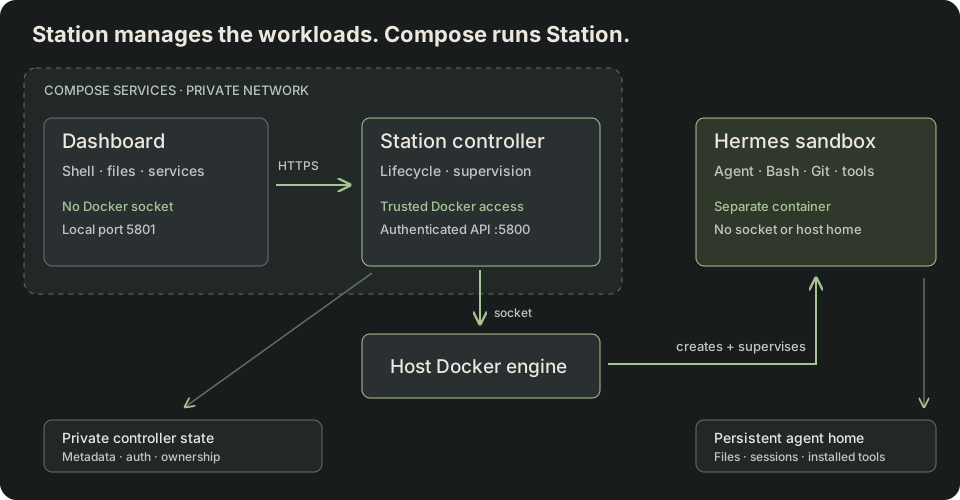
What runs where
| Component | Responsibility | Access |
|---|---|---|
| Compose | Starts and restarts the Station controller and dashboard. | Operator deployment configuration. |
| Station controller | Owns sandbox lifecycle, terminals, files and service supervision. | Docker socket and private controller state. |
| Dashboard | Authenticated web client and proxy to Station. | No Docker socket, credentials file or workload volume. |
| Hermes sandbox | Runs the gateway, agent tools and interactive shells. | Its own persistent home; configured outbound network access. |
This uses sibling containers on the same engine. It does not start a second Docker daemon inside Station. Compose does not adopt the sandbox as one of its services: Station owns its lifecycle, and its Docker labels and named volume remain after Compose is stopped.
Run the example
The Hermes sandbox example contains the application image, separate controller/dashboard build targets, Compose configuration, provisioning scripts and operational runbook. Use the checkout until the corresponding packages are published. The detailed runbook explains how to build the pinned Hermes image and initialize private settings with a reviewed seccomp profile.
# After building the Hermes image and initializing private settings:docker compose -f examples/20-hermes-sandbox/compose.yaml builddocker compose -f examples/20-hermes-sandbox/compose.yaml up -d --wait # Provision through Station; pass file paths, never credential values.node examples/20-hermes-sandbox/provision.mjs \ /private/openrouter-key.txt /private/telegram-token.txt TELEGRAM_USER_ID docker compose -f examples/20-hermes-sandbox/compose.yaml psOpen http://127.0.0.1:5801, sign in with the generated private credentials, and choose Sandboxes → worker → workspace. Commands, Terminal, Services and Files are separate pages. Start long-running agents through Services; ordinary Commands have a timeout.
When moving an existing local setup to Compose, back up first and stop its local controller before mounting the same state. Two controllers must never own one workspace root. The example retains the existing volume, sandbox identity and credentials. Its container entrypoint uses an exclusive filesystem lock and a stable controller identity to handle stale PID records after a container restart.
Networking and boundaries
The dashboard has its own network namespace and reaches the authenticated daemon over verified HTTPS on the private Compose network. It mounts only the public trust certificate; the controller keeps the private key. This lets the controller restart without stranding the dashboard in an old network namespace. Only loopback host ports are published. The sandbox uses a separate Docker network namespace: processes inside it can communicate on their own 127.0.0.1.
Bridge networking permits outbound API calls, but it is not an egress allowlist or a public-tenant network policy. The Docker socket grants powerful host-level control. Mount it only into the trusted controller; never into an agent sandbox or dashboard. Public tenants need dedicated workers, tenant-scoped authorization, independently enforced network/storage limits and production-host validation. Read the execution guide for those requirements.
For one fixed trusted agent, another option is a Station host-process adapter running inside an outer container. It needs no Docker socket inside, but all workspaces in that service share that container's isolation boundary. This example deliberately uses the container adapter and separate workload containers.
Persistence and recovery
| Event | Expected behavior |
|---|---|
| Close the dashboard tab | Agent service and shell keep running. |
| Hermes exits or crashes | Station applies the configured bounded service restart policy. |
| Controller restarts | Station reconciles its owned container and restarts desired services. Existing interactive shells are interrupted; files persist. |
| Docker is missing at startup | The container adapter refuses startup. It never falls back to host execution. |
| Engine connection is lost | Container operations fail. A connection loss does not prove the workload stopped; reconcile before retrying uncertain mutations. |
| Docker Desktop or host stops | Execution stops. Retained volumes survive unless deleted. Restore the engine and verify controller and service recovery. |
| Command timeout / forced cancellation | Containment can stop the entire workspace, including sibling services. Restart the desired service explicitly. |
Compose's restart policy restarts exited containers, not merely unhealthy ones. It does not make a sleeping laptop an always-on host. The example's API health check confirms controller responsiveness, not Telegram delivery or model-provider availability. Monitor those separately.
The Hermes home, user installs and conversations live on its named volume. Controller metadata lives in the private state mount. Back up both consistently while Station is stopped, protect backups as credentials, and test restoration. docker compose down is not a sandbox deletion command. Avoid volume-prune commands on an execution host.
The Docker and Podman adapters require an available compatible Linux engine with enforceable resource limits and seccomp. Backend selection is explicit; Podman is not an automatic failover target for existing Docker volumes.
What the local test covers
The example has exercised a real model-driven shell task, interactive dashboard access, custom installation, communication between sandbox-local processes, gateway crash recovery, persistent files and an offline backup. The deployment runbook includes controller crash recovery, exclusive ownership and missing-engine checks. The internal TLS certificate lasts one year; renew it and recreate both services before expiry as described in the example runbook. These checks do not establish multi-tenant isolation or high availability on an intended production Linux host.